
Delete your Zenist Todo account
This page explains how to delete your Zenist Todo account and associated data. Zenist Todo is provided by Xignal. Deletion cannot be undone. Export any tasks or projects you want to keep from Settings → Data before continuing.
Delete your account in the app
Connect to the internet and sign in to the account you want to delete. If you are in offline mode, switch back to online mode first.
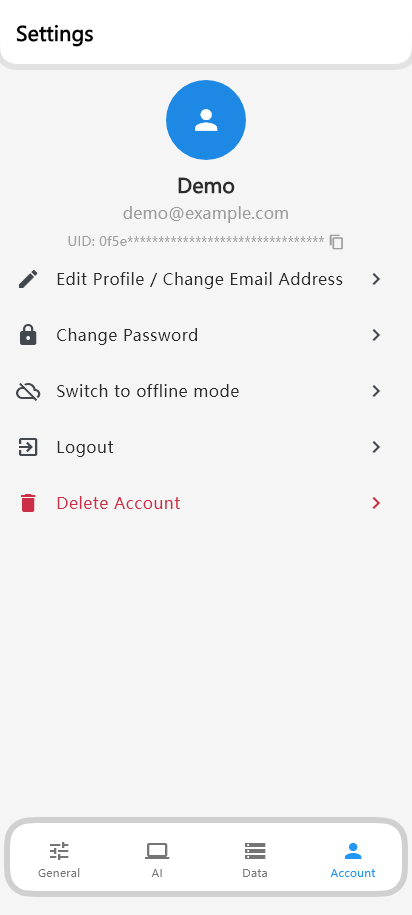
Open Settings → Account
Select the person icon labeled Account at the bottom of Settings. Check the email address, then tap Delete Account.
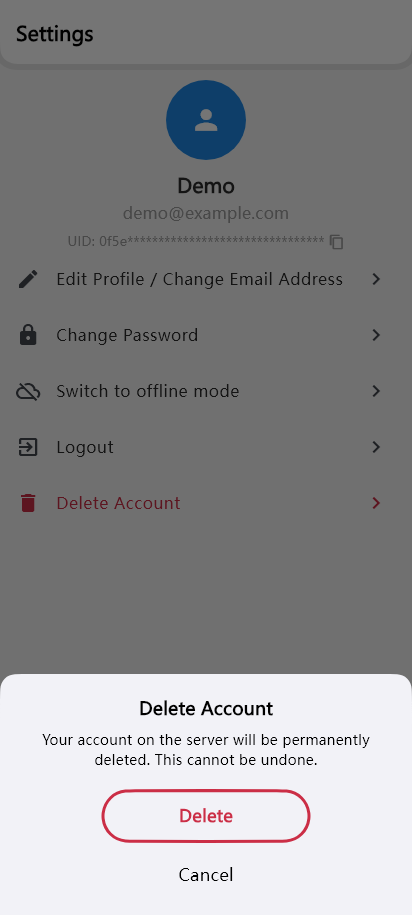
Choose Delete in the first confirmation
Read the warning that your account will be permanently deleted. Tap the red Delete option to continue, or Cancel to stop.
Type DELETE and confirm
Enter DELETE in uppercase in the confirmation field to enable Delete. Tap Delete to permanently delete your account and associated data.
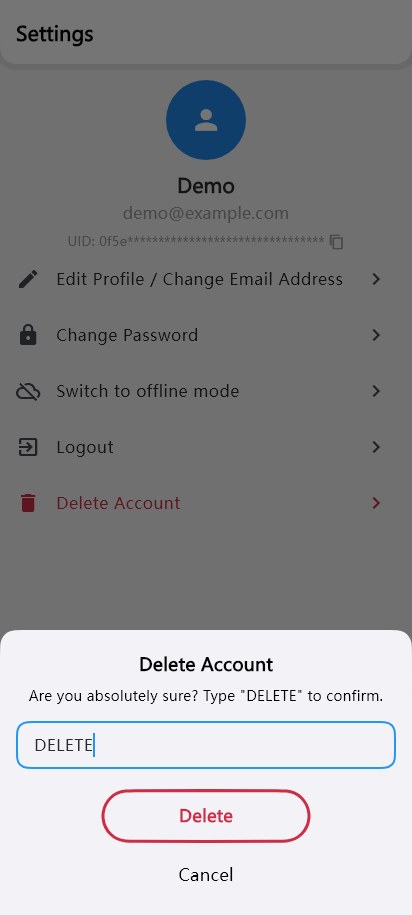
Examples rendered from the current app code. Appearance may vary with your device, theme, and text size.
A progress indicator appears while deletion is running. When complete, the app returns to the sign-in screen. If server-side deletion fails, data on your device is not deleted. Check your connection and try again, or contact us using the email option at the bottom of this page.
Data that is deleted
- Your Zenist Todo sign-in account, email address, profile information, and authentication sessions. Your Google account itself is not deleted.
- Tasks, projects, recurring task data, completion records, AI characters, functions, and memories in our active database.
- Associated account data, including AI usage, purchase status, billing events, and MCP credentials and activity records.
- In-app deletion also removes account data, settings, and chat history on the device used for deletion. An email request cannot remotely erase data on your devices or backups you have exported yourself.
Deletion timing and retained information
In-app deletion removes your account and associated data from our active database when the server operation succeeds. We do not apply an additional retention period to this data.
Authentication audit logs are retained for security purposes and configured for periodic deletion once they are more than 7 days old. Logs, backups, and other information held by third-party services follow those services’ retention and deletion policies. See our privacy policy for details.
If you have a subscription
Cancel your subscription separately through the store where you purchased it.
Manage Google Play subscriptions
Privacy Policy & Terms of Service
Request deletion without using the app
You can request account and data deletion by email even if you have uninstalled the app or cannot sign in. You do not need to reinstall the app.
Email [email protected] from your registered email address. If you use Google sign-in, include the email address of that Google account. If you no longer have access to that address, let us know. We will verify account ownership before proceeding and notify you when deletion is complete. Do not send your password or encryption passcode.
We usually reply within 24 hours. Email requests are processed after account ownership is verified. We will update you by email.